
✓ Compatible with All QuickBooks Versions · CPA Printer #1010
QuickBooks Laser Cheques Canada — CPA-Compliant. 25% More Free. Works at Your Bank.
For QuickBooks Online (Simple Start, Essentials, Plus, Advanced) and QuickBooks Desktop (Pro, Premier, Enterprise, Mac). In-house printing. Free PDF proof. Same-day printing available.
✔ Risk-free: Error on our part? We reprint & reship free. | ✔ No hidden fees

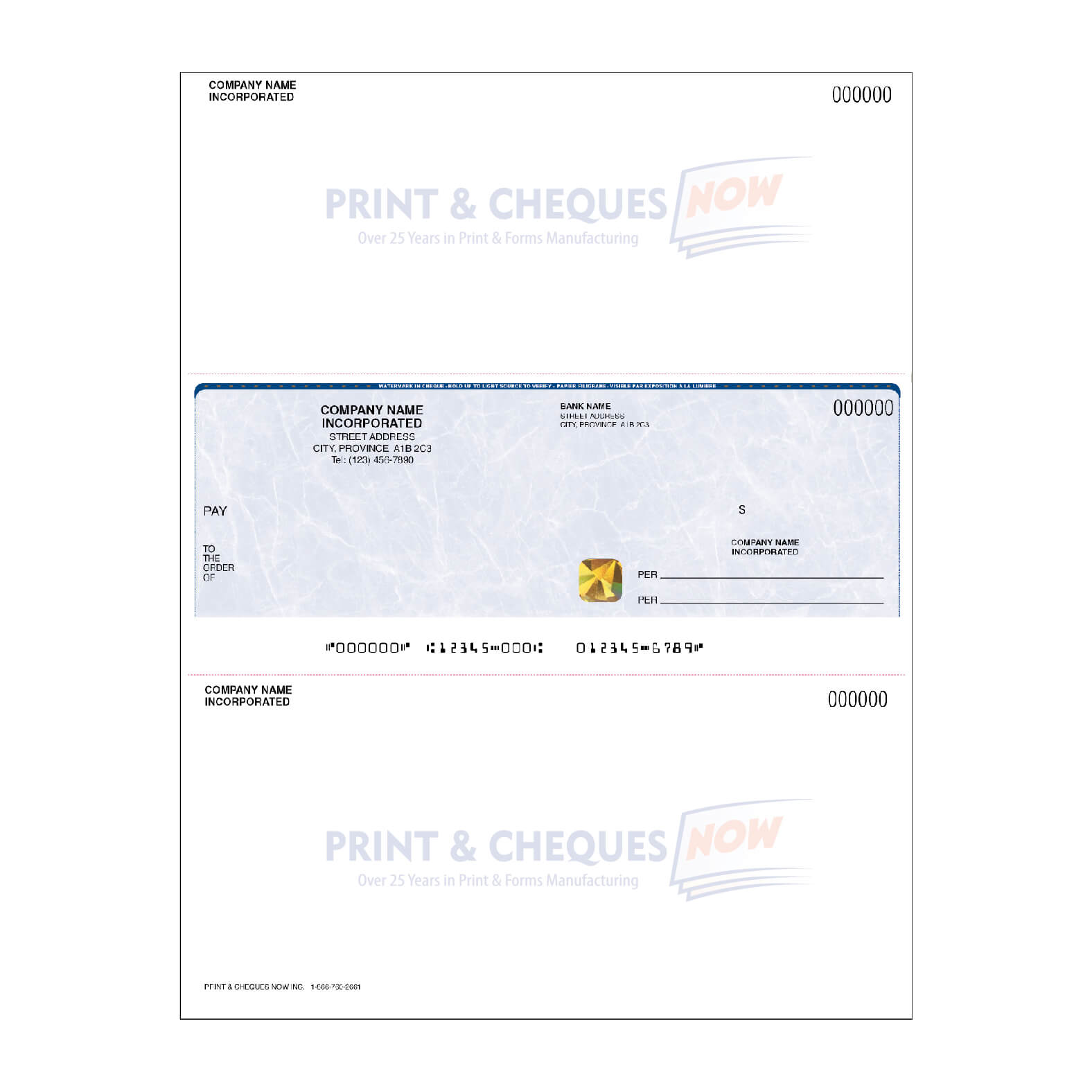
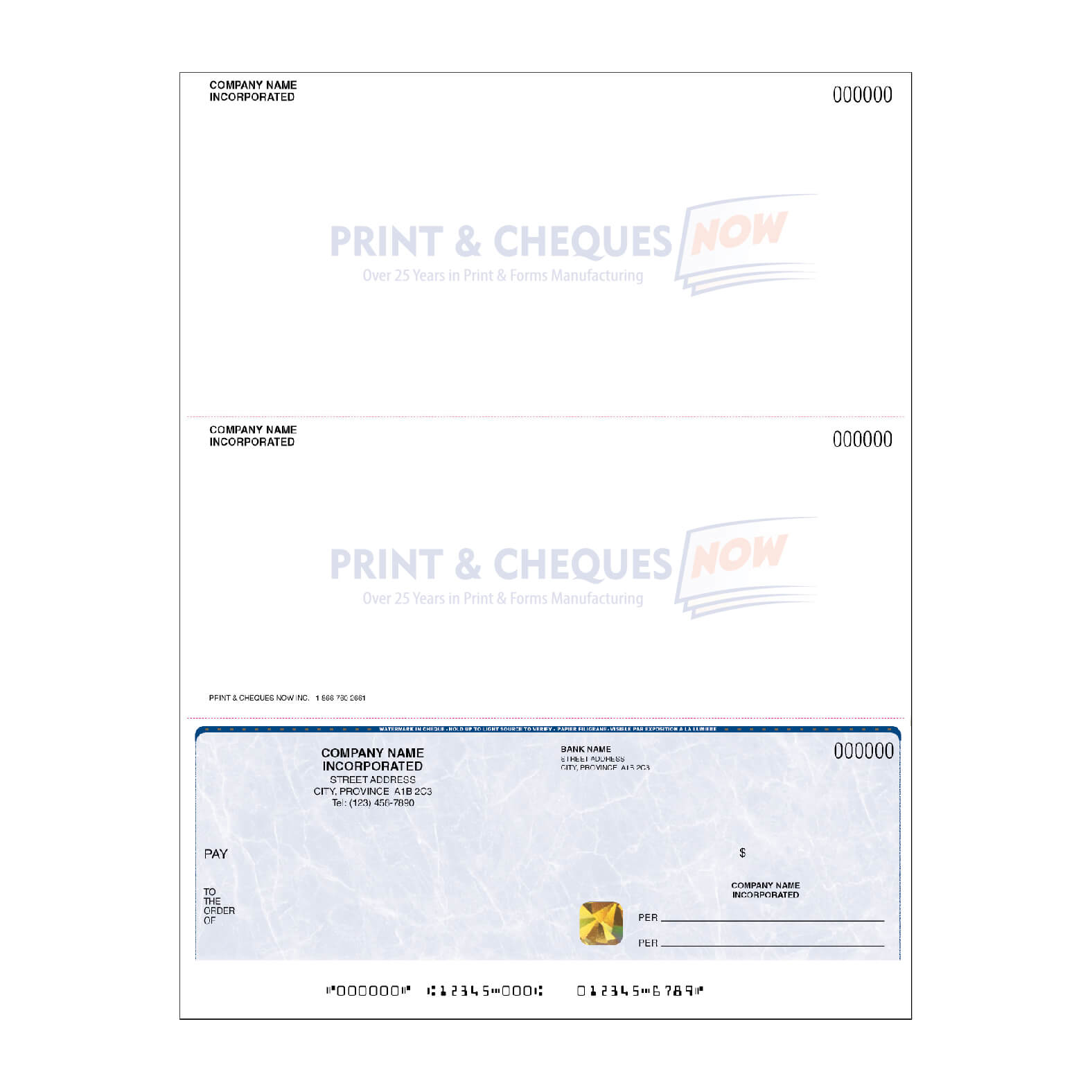
Yes — Print & Cheques Now manufactures 100% compatible QuickBooks laser cheques for all Canadian editions, including QuickBooks Online (Simple Start, Essentials, Plus, Advanced) and QuickBooks Desktop (Pro, Premier, Enterprise, Mac), as CPA Self-Accredited Printer #1010 since 2006. We guarantee bank acceptance, perfect MICR alignment, and 25% more cheques free on every order. We print in-house on our Troy Branded Konica Minolta MICR printers, ensuring quality control at every step.
Why Canadian QuickBooks Users Switch from Intuit's Cheque Vendor Lock-In to ChequesNow
Intuit's Built-In Cheque Ordering Lock-In
QuickBooks Online and QuickBooks Desktop both include an "Order Cheques" button built directly into the software — it's positioned in Settings → Expenses → Cheques (Online) and File → Printer Setup (Desktop). This convenience is by design. The button doesn't give you a choice of suppliers; it routes every Canadian QuickBooks user to one vendor: Intuit Checks, powered by D+H (Davis & Henderson). Intuit engineers the cheque supply chain to be a profit center, and every Canadian QB user who orders through the app pays Intuit's markup on top of D+H's cost.
This is classic vendor lock-in: the software you chose for accounting becomes the sales funnel for cheques you didn't choose. QuickBooks users tell us they feel trapped — there's no alternative offered inside the software, and most never realize they can order independently.
Print & Cheques Now: Intuit-Free Printing at CPA Standard 006
Print & Cheques Now prints QuickBooks computer cheques in-house as CPA Self-Accredited Printer #1010. No Intuit. No D+H. No lock-in. We use the same Canadian cheque stock D+H sources (600lb+ rolls from the same supplier), print on Troy Branded Konica Minolta MICR printers, and deliver the same CPA 006 compliance. The difference? We give you 25% more cheques free, include gold hologram foil and heat-sensitive ink at no extra cost, and offer a free PDF proof before we print anything. Same quality — instant savings — zero software lock-in.
Your print workflow remains identical. QuickBooks generates the cheque layout the same way — you just load our preprinted stock into your laser printer, and we've already tested our template alignment against all QB editions.
Are Our Laser Cheques Compatible with QuickBooks?
Compatible QuickBooks Editions
- QuickBooks Online: Simple Start, Essentials, Plus, Advanced
- QuickBooks Desktop: Pro, Premier, Enterprise, Mac
- QuickBooks Payroll: All versions (standalone and integrated)
- Cheque Positions: Top, Middle, Bottom (we test all three)
Works at All Major Canadian Banks
Our laser cheques are CPA 006 compliant and accepted at every major Canadian bank: RBC, TD, Scotiabank, BMO, CIBC, National Bank of Canada, Desjardins, and ATB. We test MICR signal strength at our Calgary facility on every batch — if your cheques don't clear on the first pass, we rerun them free.
QuickBooks Laser Cheques — Order Direct from the Manufacturer
✅ Preprinted QuickBooks Cheques
Pre-formatted for QuickBooks' standard cheque layout. Company name, address, and MICR encoded. Load into your printer and start writing payments immediately.
- ✅ Gold hologram foil included
- ✅ Heat-sensitive ink included
- ✅ True watermark security paper
- 💡 Call 1-866-760-2661 to match your exact QB layout
📋 Blank Laser Cheque Stock
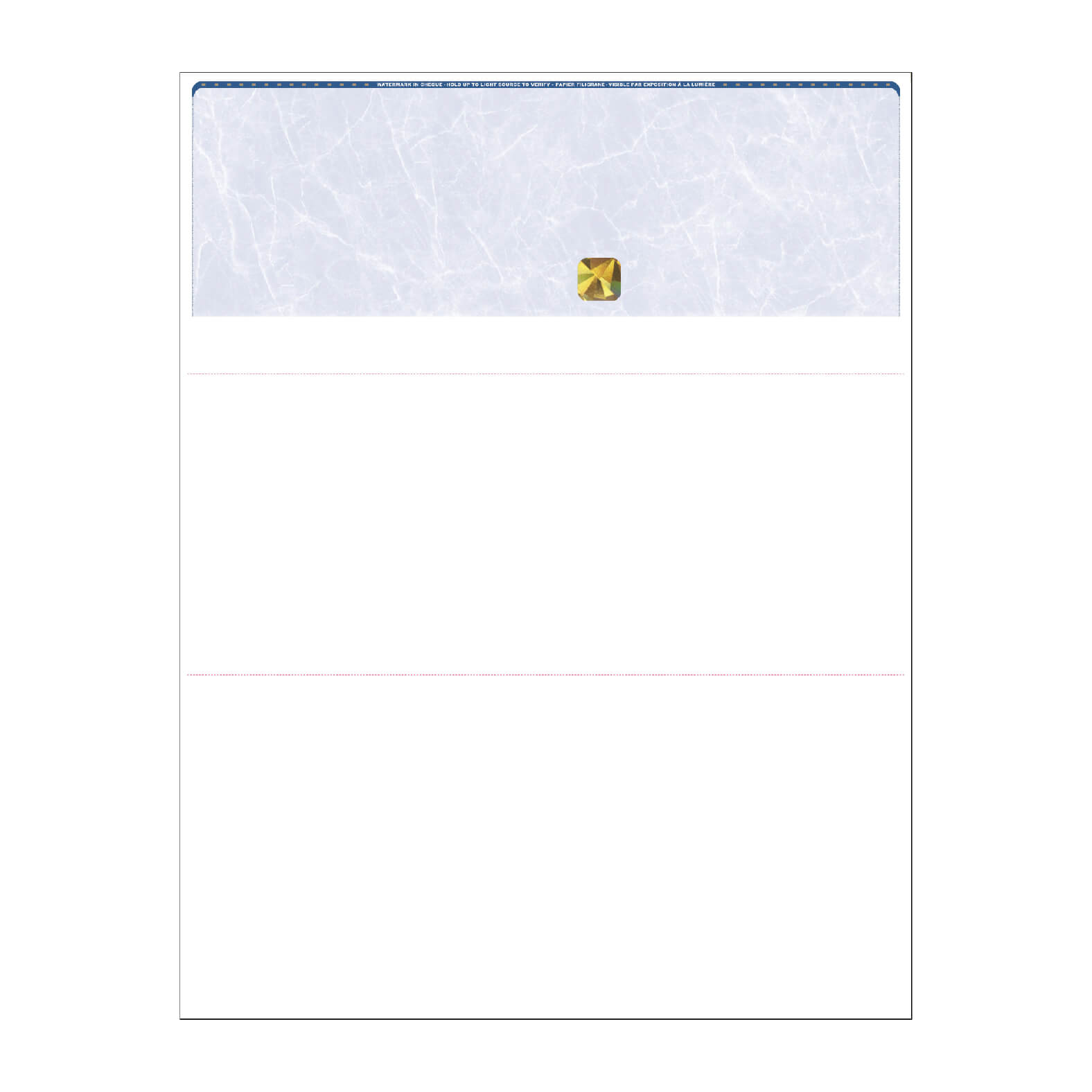
MICR-ready blank stock compatible with your existing QB cheque design. Print your own company details, or use this stock with QB's generic template.
- ✅ MICR-ready blank stock
- ✅ True watermark security paper
- ✅ Heat-sensitive ink included · Gold hologram optional on blank stock
- 💡 Ask us about MICR Toner — call 1-866-760-2661
What You Get — 25% More Cheques FREE
| Order Qty | Free Cheques | Total Received |
|---|---|---|
| 50 | +16 Free | 66 |
| 100 | +26 Free | 126 |
| 250 | +76 Free | 326 |
| 500 | +126 Free | 626 |
| 1,000 | +250 Free | 1,250 |
| 2,000 | +500 Free | 2,500 |
| 5,000 | +1,250 Free | 6,250 |
Visit the order page for current pricing. No hidden fees.
Bank-Grade Security Included at No Extra Cost
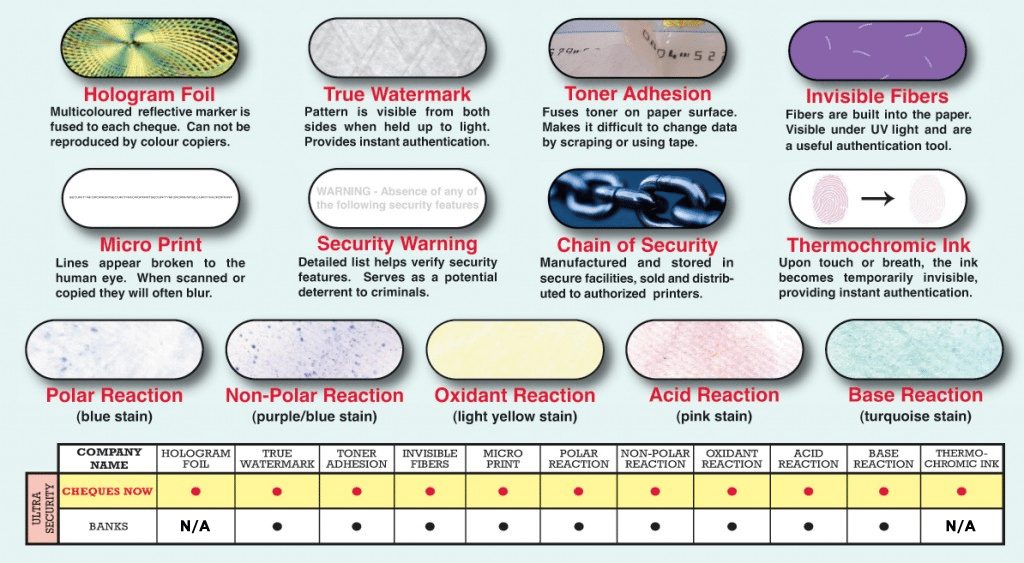
Every QuickBooks laser cheque from Print & Cheques Now includes four premium security features at no additional cost.
Gold Hologram Foil
Impossible to copy on any scanner or printer. Included free on every preprinted laser order.
Heat-Sensitive Ink
Changes colour when touched — detecting chemical or heat alteration. Included free on preprinted laser.
Watermark Paper
Embedded in paper fibres. Visible under light, impossible to photocopy. UV fibres and chemical sensitivity.
MICR Toner Adhesion
Prevents washing or scraping. MICR ink clears all Canadian bank processing on the first pass.
Heat-sensitive ink is included on all cheque stock. Gold hologram is included on preprinted laser cheques and optional on blank stock. All stock includes watermark security paper and MICR-ready encoding. See all security features →
Tired of Intuit's Cheque Vendor Lock-In?
QuickBooks has a built-in "Order Cheques" button that sounds convenient — until you realize it only routes to Intuit Checks, powered by Davis & Henderson (D+H). There is no alternative. Intuit has engineered the cheque supply chain to be a profit center, and every Canadian QuickBooks user who orders through the app pays Intuit's markup on top of D+H's cost. D+H is owned by Finastra, a London-based financial software conglomerate — so your Canadian QuickBooks cheque order is ultimately funding a multinational, not a Canadian company.
Print & Cheques Now prints QuickBooks laser cheques in-house as CPA Self-Accredited Printer #1010. No Intuit. No D+H. No lock-in. Same CPA 006–compliant quality — with 25% more cheques free, gold hologram included, heat-sensitive ink included, and a free PDF proof before we print anything. We source cheque stock in 600lb+ rolls from the same Canadian supplier D+H uses — identical security features, identical weight, identical bank acceptance. Our facility in Calgary is third-generation family-owned and family-run. Live agents answer phones — no offshore call centres.
Step-by-Step: Setting Up QuickBooks to Print CPA-Compliant Cheques
Set up your QuickBooks payment and cheque printing to work with Print & Cheques Now laser cheques — no special software required.
QuickBooks setup note: Both QB Online and QB Desktop have built-in cheque formatting. When we test your template alignment in our Calgary facility, we run a test print on your specific QB edition to confirm MICR line signal strength and cheque position accuracy before shipping your order.
Confirm your bank details in QuickBooks Settings
QB Online: Settings → Chart of Accounts → select your bank account → confirm account number, transit number, institution number. QB Desktop: Edit → Preferences → Checking → Company Preferences → verify bank account setup. These fields encode your MICR line on the cheque. If you run multiple bank accounts in QB, verify that each has the correct MICR encoding before ordering.
Choose your cheque position and order from us
On our order form, select your QuickBooks edition (Online Simple/Essentials/Plus/Advanced, or Desktop Pro/Premier/Enterprise). Specify your preferred cheque position: cheque-on-top (default), cheque-in-middle, or cheque-on-bottom. Upload a void cheque from your current bank so we match the layout exactly. We'll send you a free PDF proof showing how your cheque will print before we manufacture anything.
Approve your free PDF proof
We email your proof within a few hours. Verify: (1) the company name and address match your QuickBooks account information exactly, (2) the MICR sequence (left-to-right: cheque number, transit/institution, account) is correct, (3) the cheque position on the page matches your preference. CPA Printer ID 1010 is self-accredited, so no additional bank testing is required once you approve.
Prepare payments in QuickBooks and print cheques
QB Online: Go to + New → Check → fill in payment details → select "Print" before saving. QB Desktop: Go to Banking → Write Checks → fill in payment details → Print Cheques. QB will generate a preview showing how data will print on our preprinted stock. Load our cheques into your laser printer tray in the position shown on the proof.
Print your cheques and submit for bank clearance
Feed the cheques into your laser printer and print your payment data. Run your first batch to plain paper as a test to confirm alignment with our stock, then print to your cheques. Our Troy Branded Konica Minolta MICR printers and CPA 006 MICR standard guarantee first-pass clearance at every Canadian bank. Your format is saved in our system — reorders through Express Reorder typically take under 2 minutes.
Trusted by 46,000+ Canadian Businesses
★ 4.9/5 across 800+ verified Google reviews. CPA Self-Accredited Printer #1010 since 2006. In-house printing. Canadian-owned and family-run.
"We've been on QuickBooks Online for years, and the 'Order Cheques' button always routed us to Intuit Checks with a hefty markup. After switching to Print & Cheques Now, we're saving over 40% per order — and getting 25% more cheques. Free PDF proof before printing. Cleared at TD without any issues."— Services Business Owner, Ontario
"QB Desktop Pro is our accounting backbone, but cheques were always expensive. Print & Cheques Now filled the gap perfectly. Same CPA compliance, 25% more stock, and they print in-house. We ordered, got a proof the next day, approved it, and had cheques in hand within a week."— Consulting Firm, Alberta
"QuickBooks is great, but the built-in cheque ordering is a rip-off. Print & Cheques Now answered our call on the first ring, walked us through the whole setup, and delivered CPA-compliant cheques faster than I expected. We've reordered three times since — every time is quick and smooth."— Non-profit Bookkeeper, British Columbia
Canadian-Owned. Family-Run. In-House Since 2006.
Every QuickBooks cheque order is printed by our team — not outsourced. CPA #1010. BBB A+ ↗. 46,000+ businesses. 800+ reviews at 4.9/5.
Frequently Asked Questions — QuickBooks Cheques
What are QuickBooks laser cheques — also called computer cheques or voucher cheques?
QuickBooks laser cheques — also called computer cheques, voucher cheques, or laser checks — are CPA-compliant cheques formatted for laser printer printing from QuickBooks Online or QuickBooks Desktop. They come in cheque-on-top, cheque-in-middle, and cheque-on-bottom positions to match standard bank cheque layouts. Print & Cheques Now manufactures 100% compatible QuickBooks computer cheques as CPA Self-Accredited Printer #1010, with our Troy Branded Konica Minolta MICR printers ensuring perfect signal strength and bank acceptance on the first pass.
Does QuickBooks offer in-app cheque printing or a bundled cheque supplier?
Yes — QuickBooks Online and QuickBooks Desktop both include an "Order Cheques" button in the settings. However, that button routes directly to Intuit Checks, which is powered by D+H (Davis & Henderson) in Canada. There is no alternative supplier offered within QuickBooks — if you want to break the Intuit vendor lock-in, you source cheques independently through a provider like Print & Cheques Now. We offer the same CPA 006 compliance, identical security features, and 25% more cheques free on every order.
Are Print & Cheques Now cheques compatible with QuickBooks Online and Desktop?
Yes — Print & Cheques Now QuickBooks cheques are fully compatible with QuickBooks Online (Simple Start, Essentials, Plus, Advanced), QuickBooks Desktop (Pro, Premier, Enterprise, Mac), and QuickBooks Payroll. Cheques work with QB's native payment printing and are pre-aligned to all major Canadian bank cheque positions. CPA Self-Accredited Printer #1010 — no additional setup required beyond confirming your bank details in QB settings.
How much can I save versus ordering QuickBooks cheques through Intuit Checks?
Canadian QuickBooks users typically realize 25–60% savings by ordering from Print & Cheques Now instead of through Intuit Checks. Our pricing matches D+H's baseline, then we add 25% more cheques free on every order — an instant value gain. Where Intuit Checks charges their standard rate for 250 basic voucher cheques with no hologram foil or heat-sensitive ink, Print & Cheques Now gives you 325 QB cheques with both security features included at no extra cost — 75 more cheques and better fraud protection.
Do you provide a free PDF proof before printing my QuickBooks cheques?
Yes — every Print & Cheques Now order includes a free PDF proof emailed before we print anything. You verify the layout and company information match your QuickBooks account exactly before approving. Proofs are typically sent within a few hours of order placement at no extra charge. Our production team in Calgary tests every template in our facility to confirm MICR signal alignment and cheque position accuracy.
What is the shipping time for QuickBooks cheques?
Print & Cheques Now ships Canada-wide from Calgary, Alberta. Rush orders approved before 2 PM EST are printed the same business day and ship via air courier for next-day delivery to most Canadian cities. Standard delivery takes 2–5 business days. Call 1-866-760-2661 for rush availability and carrier options (Canada Post, UPS, FedEx, or Purolator).
Can I customize the cheque layout for my QuickBooks account?
Yes — we work with you on the free PDF proof to adjust cheque position (top, middle, or bottom) and company information placement. Upload a void cheque from your current bank with your order so we match your preferred layout exactly. All QuickBooks editions (Online and Desktop) support the same standard cheque formats — customization happens via the proof review. Our in-house printing process ensures your data aligns perfectly with our preprinted stock.
Also Compatible With These Accounting Platforms
All 195+ programs in our hub use the same CPA-compliant laser cheque stock — 25% more free on every order.
CPA-Compliant QuickBooks Cheques Delivered Fast & Secure
CPA Printer #1010 since 2006. In-house printing. Free PDF proof. 25% more cheques free. Accepted at every Canadian bank — guaranteed.
Why pay bank pricing? Get 25% more cheques free, CPA-accredited quality, and same-day printing — direct from the manufacturer.
✍️ Manual Cheques
Write cheques by hand — no software needed. 50% more cheques free.
Manual Cheque Options🧑 Personal Cheques
Personal banking and household payments. 60% more free vs your bank.
Personal Cheque Pricing📘 Deposit Books
Bank deposit forms — pre-printed with your account info. Same-day shipping.
Order Deposit BooksCheques comply with Canadian Payment Standards (Payments Canada) ↗ — CPA Self-Accredited Printer #1010.
Last updated: April 2026 — For official QuickBooks product information, visit QuickBooks by Intuit.
Trademark & Affiliation Notices:
Intuit Checks / Intuit / QuickBooks / Davis & Henderson: Independent company — not affiliated with, endorsed by, or sponsored by Intuit Inc., Davis & Henderson Corporation, Finastra, or Deluxe Corporation. References are for factual and comparative purposes only.
Address: Print & Cheques Now Inc. · 240007 Frontier Cres #11 · Calgary, AB T1X 0R4 · Phone: 1-866-760-2661
QuickBooks is a trademark of Intuit Inc. Print & Cheques Now Inc. is not affiliated with, endorsed by, or sponsored by Intuit Inc. All software names referenced are trademarks of their respective owners. Print & Cheques Now Inc. is not affiliated with or sponsored by any software company referenced. Mentions indicate product compatibility only.
Explore more cheque options
Looking for a different cheque type? Browse our full range of CPA-compliant cheque products:
List of Laser Cheque Accounting Software Programs
Specifications, pricing, and delivery options.
Learn moreLaser cheques
Laser-printable cheques compatible with QuickBooks, Sage, and other accounting software.
View laser chequesReorder cheques fast
Reorder a previous cheque order in minutes — your specifications stay on file.
Reorder your cheques